The Portrait Prompt Formula: Getting Consistent, Realistic AI Faces
Skin that reads as real, a face that stays consistent across generations, and framing built for Instagram — the formula behind our gallery's strongest category.
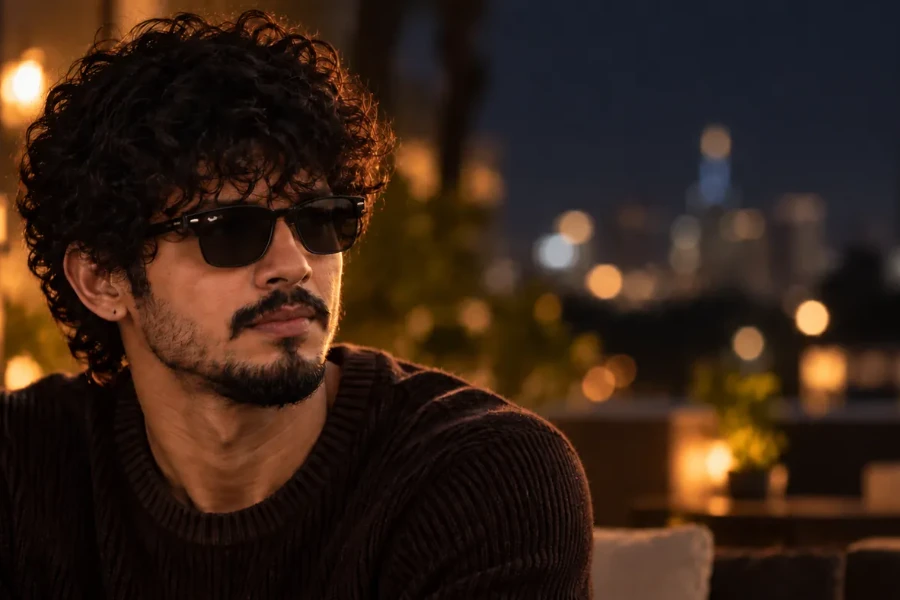
The Portrait Prompt Formula: Getting Consistent, Realistic AI Faces
Portraits are the hardest category to get right with AI, and the most common failure isn't a bad prompt — it's two specific problems: skin that looks like plastic instead of skin, and a face that changes slightly every time you regenerate it. If you've already got the basics down from [How to Write AI Image Prompts: The Complete Beginner's Framework], this guide picks up where that one leaves off and goes deep on what actually makes portraits work — and stay consistent.
Why AI Portraits Look "Off" Even When Everything Else Is Right
You can nail subject, lighting, and composition and still end up with a portrait that reads as artificial. Almost always, it's one of two things: over-smoothed, waxy skin (the model defaulting to its most "averaged" skin texture because nothing told it not to), or facial proportions that are technically fine but slightly generic — nothing anchoring the face as a specific person rather than an average of faces. Both are solvable with specific language, not luck.
Skin Realism: Naming Texture Instead of Assuming It
Left unspecified, most models default toward smooth, evenly-lit, blemish-free skin — which is exactly what reads as fake. Naming real skin texture pushes against that default:
Texture cues: "visible skin texture," "natural pores," "subtle skin imperfections"
Tone variation: "natural skin tone variation," "slight redness at the cheeks"
Avoid over-correction terms: "airbrushed," "flawless," "smooth skin" — these push the model toward the exact plastic look you're trying to avoid
A prompt with even one texture term ("visible pores, natural skin texture") consistently reads as more photographic than an otherwise-identical prompt without it.
Getting a Consistent Face Across Multiple Generations
This is the single biggest pain point unique to portraits, and it's the reason a generic prompting guide doesn't cover it: illustration and landscape work doesn't need the same subject to reappear. Portraits often do — a series, a character, a recurring subject for a feed.
Three things actually help:
Over-specify facial features, every time, not just once. "A woman with a straight nose, defined cheekbones, deep-set brown eyes, a small scar above the left eyebrow" gives the model concrete anchors to return to. Vague descriptions ("an attractive woman") regenerate differently every time because there's nothing specific to hold onto.
Reuse the exact same descriptive phrasing across generations. Small wording changes ("brown eyes" vs. "dark brown eyes") can shift the result more than expected. Keep your feature-description block identical between generations, and only change the parts you actually want to vary (lighting, pose, outfit).
Use seed-locking if your tool supports it. Most current generators let you lock a seed value alongside a prompt, which meaningfully improves consistency between runs of the same description. This isn't a substitute for a specific prompt — it's a multiplier on top of one.
None of these guarantee pixel-identical results between generations (that's not how these models work), but combined, they get you close enough for a consistent character or recurring subject.
Cinematic Lighting for Portraits, Specifically
The general lighting vocabulary is covered in [Cinematic Lighting Prompts Explained] — for portraits specifically, three setups do the most work:
Golden hour rim light: warm, soft, flattering — the most Instagram-native portrait look, backlighting that separates the subject from the background
Soft window light: natural, editorial, low-contrast — reads as candid rather than staged
Single-source studio light with soft shadow: more controlled, more "shot," better for a deliberate editorial feel rather than a candid one
Pick one intentionally rather than stacking two — "golden hour" and "studio light" in the same prompt fight each other and the model has to average them, which is where portraits start looking muddy.
Framing for Instagram, Not Just "A Portrait"
Instagram-native framing isn't the same as generic portrait framing. A few adjustments that matter specifically for feed and story content:
Aspect ratio: vertical (4:5 for feed, 9:16 for stories) reads as native content rather than a cropped photo — full breakdown in our [Aspect Ratios & Image Sizing for AI Art] guide
Eye-line: "eyes at upper third of frame" keeps the composition feed-friendly without extra empty headroom
Distance: "close-up" or "medium close-up" outperforms full-body for engagement in this format — faces read better at small sizes than full figures do
Building a Portrait Prompt, Step by Step
Subject + facial detail: [insert your real starting point — e.g. "a man in his 22s, deep-set grey eyes, weathered skin, short black beard"]
Skin texture cue: [insert — e.g. same prompt + "visible skin texture, natural pores"]
Lighting: [insert — e.g. same prompt + "golden hour rim light"]
Composition/framing: [insert — e.g. same prompt + "close-up, vertical 4:5 frame, eyes at upper third"]
Exclusions if needed: [insert — e.g. same prompt + "no airbrushing, no text"]
See more of this in practice: browse [Portrait prompts on Visulora's Explore grid] — this is our deepest category, and most of what's above is drawn directly from what consistently works there.
Common Mistakes With AI Portraits
Leaving skin texture unspecified, then being surprised by the plastic look
Changing facial-feature wording slightly between generations, breaking consistency without realizing that's the cause
Stacking two lighting setups in one prompt instead of committing to one
Using generic portrait framing (centered, medium shot) instead of Instagram-native vertical framing and eye-line placement
Over-correcting with "flawless" or "airbrushed" when the goal was realism, not a beauty-filter look
Frequently Asked Questions
Why does the same prompt give me a different face each time? Some variation between generations is expected — these models aren't deterministic. What you can control is how much it varies: highly specific, consistently-worded facial descriptions (and seed-locking, if available) narrow that variation significantly.
How do I stop AI portraits from looking airbrushed? Name real skin texture directly ("visible pores," "natural skin texture," "subtle imperfections") and avoid terms like "flawless" or "smooth skin," which push the model toward the over-smoothed look you're trying to avoid.
What's the best aspect ratio for Instagram AI portraits? 4:5 for feed posts, 9:16 for stories — both read as native content rather than a cropped photo. See our [Aspect Ratios & Image Sizing for AI Art] guide for the full breakdown across use cases.
Does seed-locking guarantee an identical face every time? No — it improves consistency meaningfully but isn't a guarantee. It works best combined with a specific, unchanging facial-feature description, not as a replacement for one.
What's different about a "cinematic" portrait versus a regular one? Mainly lighting and framing intent — cinematic implies deliberate, motivated lighting (rim light, single-source, golden hour) and a composed rather than snapshot-style frame, as opposed to flat, even, or ambient lighting.
Try It Yourself
Start with a subject you want to make recurring, write out the facial-feature block once, and reuse it exactly across your next few generations rather than rewriting it each time — that single habit fixes more consistency problems than any other change. For more on the base framework this guide builds on, see [How to Write AI Image Prompts], or browse [Portrait prompts on the Explore grid] to see the formula in action.