Red Silhouette AI Photo Prompt – Moody Backlit Profile
By Rupesh Bhagat ·
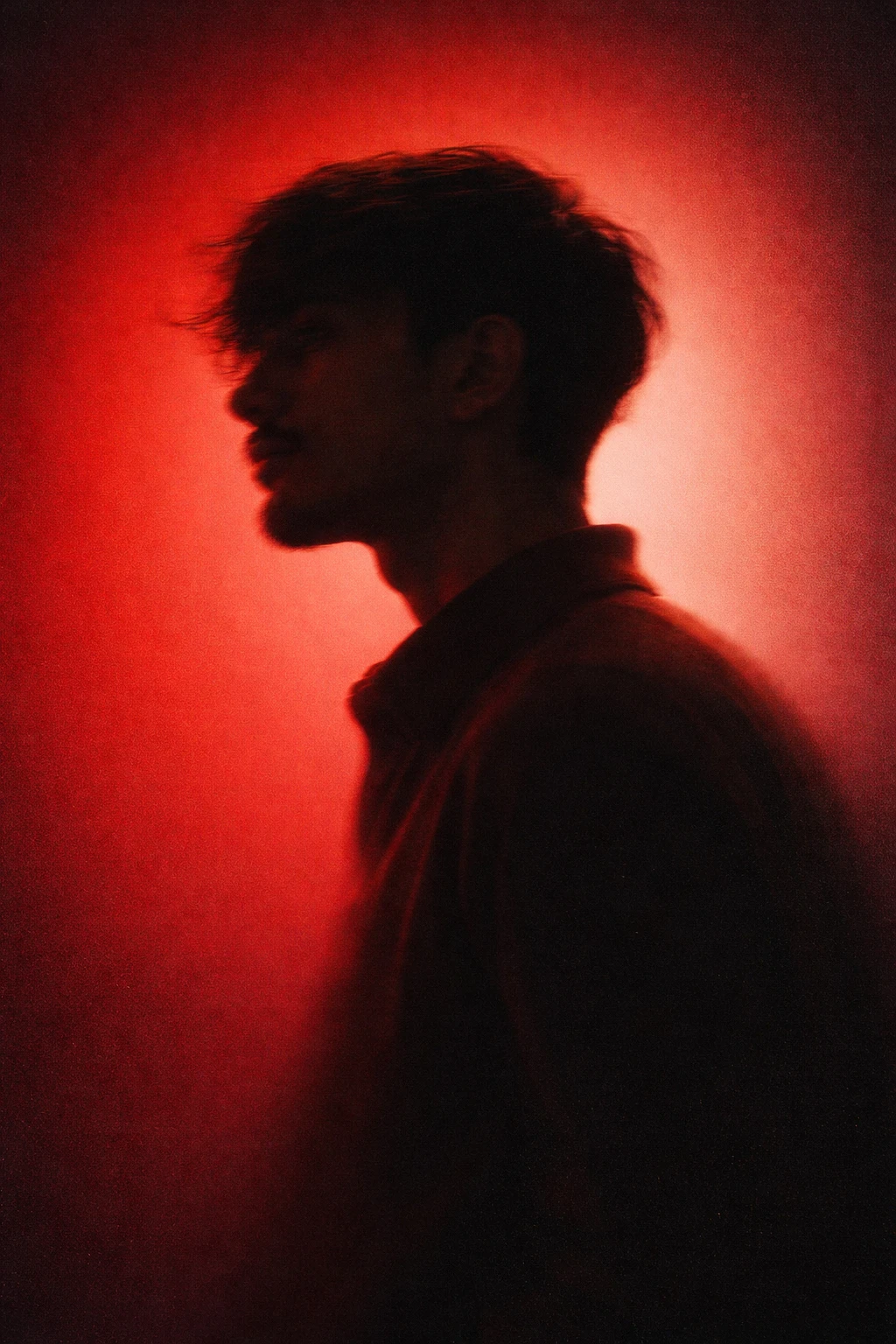
A side profile silhouette against a glowing red halo, with soft grain and light motion blur for a moody film look. Make it in ChatGPT with a photo.
The prompt for Red Silhouette AI Photo Prompt – Moody Backlit Profile
Create a moody red silhouette portrait of the person from the uploaded image. Use the uploaded reference photo for the person's face and keep their facial identity, skin tone and age exactly the same. Output must be STRICTLY 3:4 vertical (Instagram post). The person is shown in side profile facing left, from the chest up, the face mostly in shadow so only the outline of the nose, lips, beard and jaw is visible. They wear a dark collared shirt; for a woman, the same dark collared shirt. Keep their natural hair, slightly messy, with loose strands catching the light. Setting: a plain wall behind them. Lighting: a single strong red light behind the head creating a glowing halo that fades from bright pinkish-white in the centre to deep red and then black at the edges; no light on the front of the face. Camera: eye level, medium close-up, a slight motion blur on the hair and shoulders. Style: grainy, analogue film look with soft focus and heavy film grain. Mood: mysterious, intense and dreamy. No text, no watermark, no logos, no extra people, no distorted hands or faces.
About this image: Red Silhouette AI Photo Prompt – Moody Backlit Profile
Almost everything here is shadow. The subject is seen in side profile, facing left, with the face kept dark so only the outline of the nose, lips, beard and messy hair shows. A strong red light behind the head creates a glowing halo that turns pinkish-white in the centre and fades to black at the edges, and a little motion blur softens the shoulders.
Open ChatGPT, upload a clear side-profile photo of your face and paste the prompt. A profile reference matters more than usual here, because the outline is the only part of the face you see.
For variations, swap the red glow for deep blue or purple, or turn the person to face the camera with only a rim of light on the hair. You could also ask for a tiny bit of light on the eyes.
Creator's tip: If the face comes out too bright, add "no front light, face in full shadow" to the lighting line.
Tags: cinematic portrait prompt, creative ai photo effect, ai portrait prompt
More like this
 Spotlight AI Photo Prompt – Yellow Wall Shadow Portrait
 AI Portrait Photo Prompt – Red Frame Editorial Style
 Cinematic AI Portrait Prompt – Midnight Blue Motion Effect
 Suede Jacket Portrait AI Photo Prompt – Moody Cinematic
 Indian Traditional Portrait AI Photo Prompt – Pink Elegance
 Black and White Portrait AI Photo Prompt – Vintage