Jatayu Edit AI Video: Viral Ramayana Reel in Google Flow
Make the viral Jatayu edit in Google Flow with my free reference video and the 2-line Hindi prompt that worked. Exact settings, 30 credits, and error fixes.
By Rupesh Bhagat · · Updated
Last updated: 14 November 2026. Google Flow changes its models, modes and credit costs often, so I'll update this guide when they change.
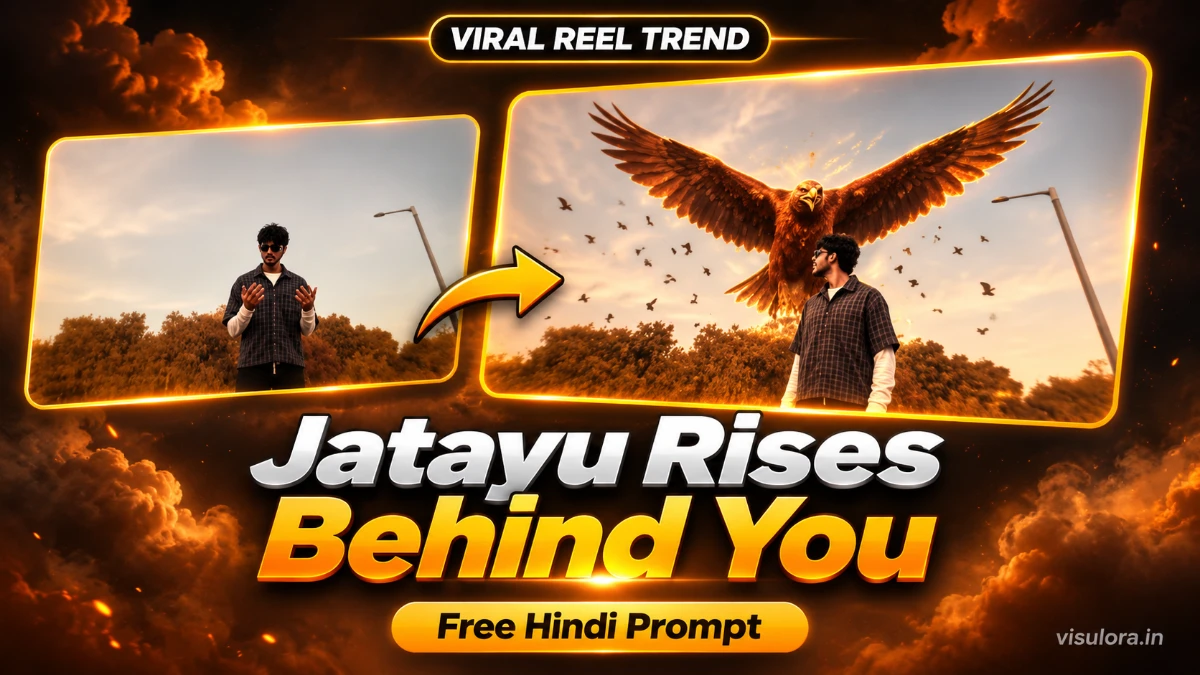
The Jatayu edit is the reel everyone is posting this week. A man stands still under a golden evening sky. Then a giant reddish-brown eagle, like Jatayu from the Ramayana, rises up behind him with its huge wings spread wide, while a flock of birds circles in the sky. It feels like a scene from a big-budget film, and it gives most viewers goosebumps.
I made my own version in Google Flow with one photo of myself and a 2-line Hindi prompt. It took about 30 credits. Below are my exact settings and prompt, the mistake that kept giving me errors, and a second method if you don't want to use a reference video at all. You can also download my result to use as your reference video.
My finished reel, with music, is on Instagram: watch the reel on @bhagat_edits.
What you need for the Jatayu edit
A clear photo of yourself. Facing the camera, in daylight, face fully visible. No sunglasses, cap or hand on the face.
A reference video. You can download mine above. (Method 2 below works without one.)
A Google account. Flow runs on it, and free accounts get 50 credits a day.
Google Flow. Open it at labs.google/flow in your browser or use the Flow app.
Which method should you use?
If you want the reel to look like the one everyone is posting, use Method 1. That's the method I used.
Method 1: Make the Jatayu edit with my reference video (the way I did it)
Step 1: Download the reference video
Download my result from the top of this guide. It's 15 seconds long, 16:9 and has no sound, which matters: Flow often fails with videos that have audio.
Using a different clip? Mute it and keep it to 15 seconds or less before you upload it. Use any clip only as a reference for your own generation. Don't repost someone else's video as your own.
Step 2: Start a new project and upload
Open Google Flow and sign in.
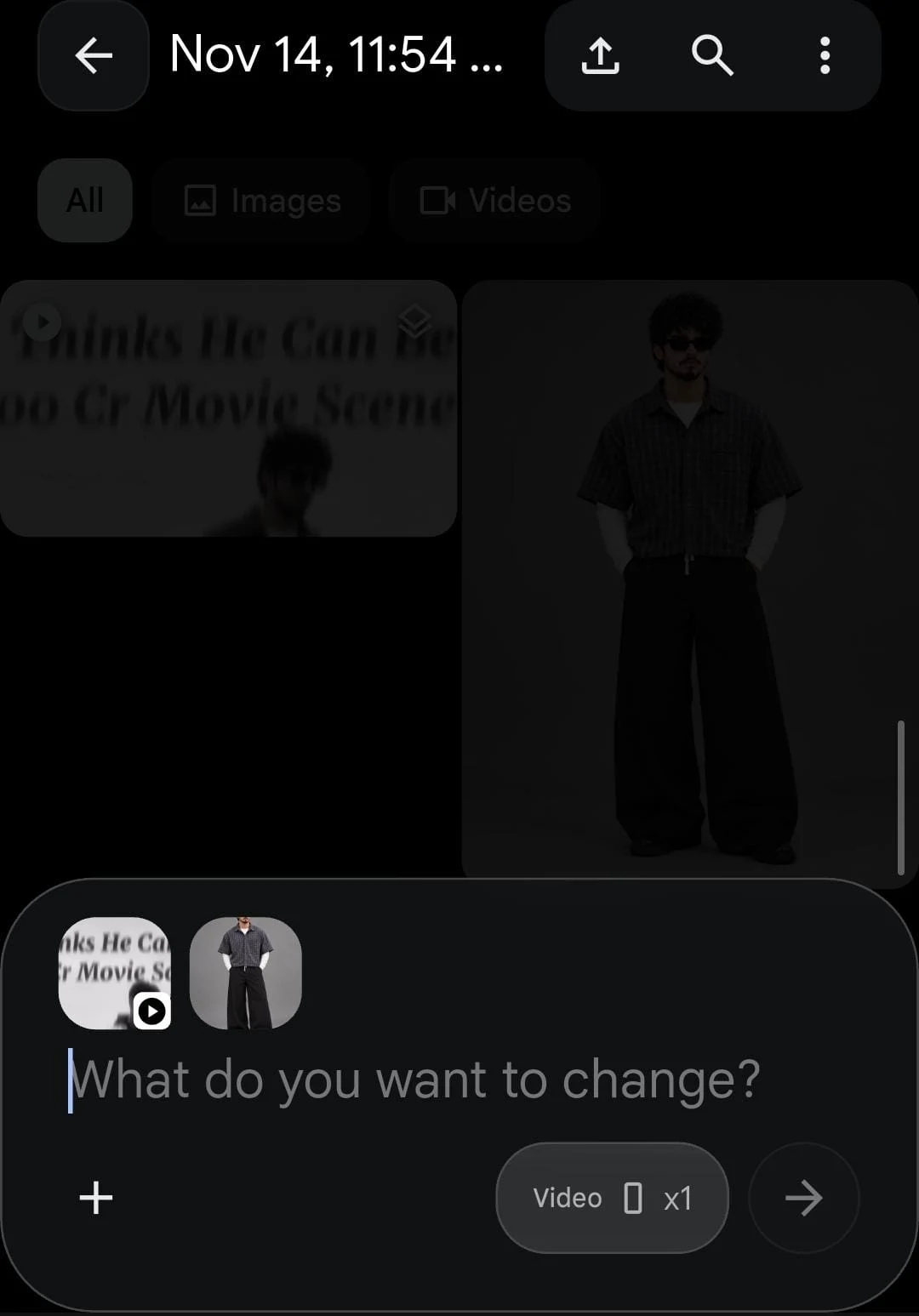
Tap New project and choose video mode with Ingredients.
Upload the reference video first, then your photo.
Make sure both are selected, with a tick or highlight. If your photo isn't selected, Flow keeps the original face.
Step 3: Choose the settings
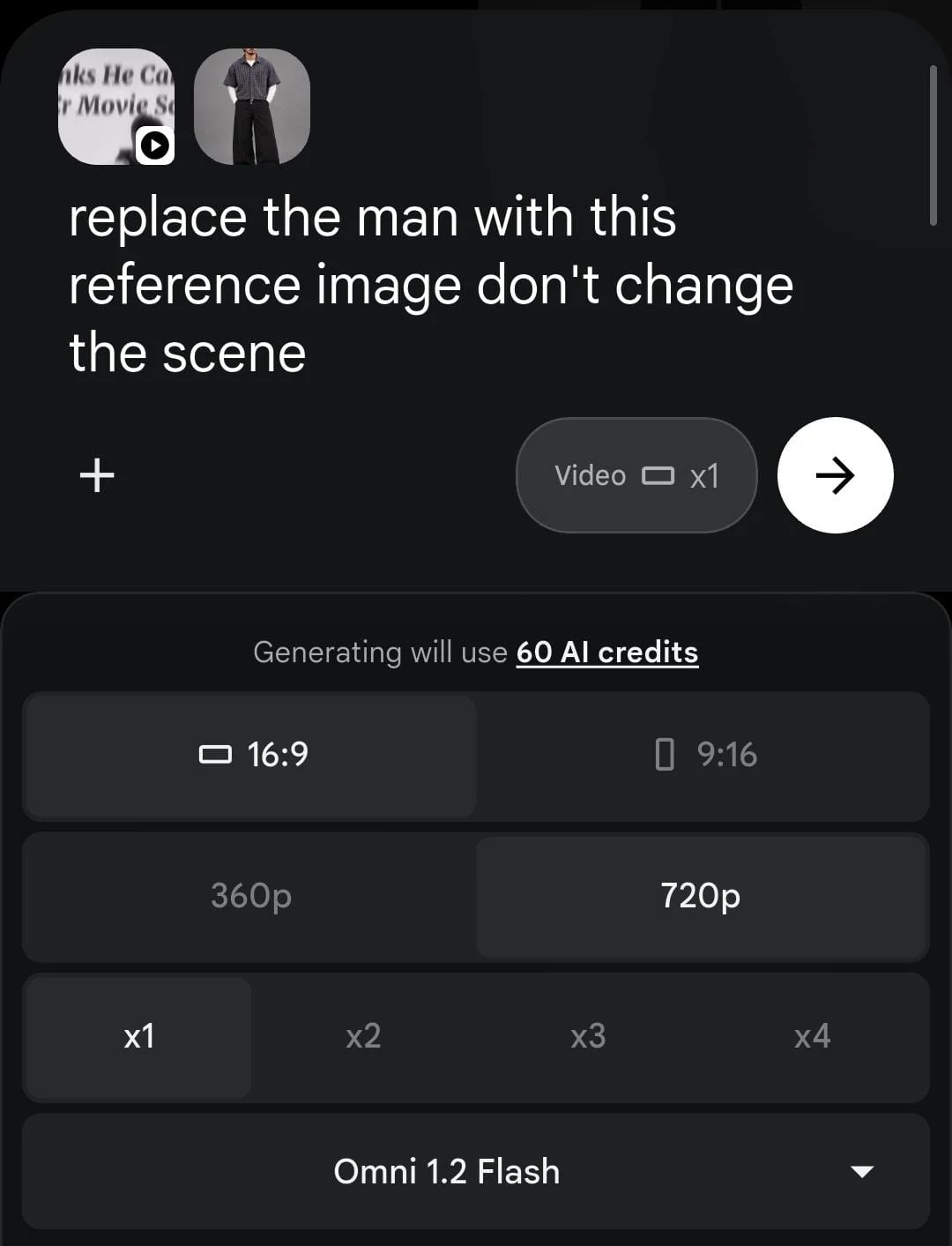
These are the exact settings I used:
Model: Omni 1.2 Flash. Since its latest update it can make videos of about 15 seconds.
Aspect ratio: 16:9. The trend is horizontal, because the wings need the width.
Duration: 15 seconds, to match the reference video.
Outputs: x1.
My generation cost about 30 credits. Check the number Flow shows before you tap generate, because costs change.
Step 4: Paste the prompt and generate
This is the exact prompt I used. It's in Hindi and only two lines long:
is video me jo ladka hai uski jagah image waale ladke ko use Karo, dress bhi image waala hi rakhna , aur sab same hona chahiye
In English it means: "Replace the boy in this video with the boy in the image, keep the dress from the image too, and keep everything else the same."
Before this, I tried a long, detailed English prompt. The short Hindi one gave me the better result. The reference video already holds the scene, the eagle and the camera, so the prompt only has to say what to change.
Prefer English? This detailed version says the same thing and adds a few guardrails:
Use the reference video for everything: the scene, sky, camera angle, timing, the giant eagle rising behind the man, the flock of birds and the warm golden colour grade. Replace only the man with the person in my photo. Keep their face, hair and clothes exactly as in the photo, clearly visible from the first frame to the last. Keep the eagle the same huge size with its wings fully spread. Do not add any text, titles, captions or logos.
Tap generate and wait. Watch the whole clip before you download it. Check your face in the last seconds, and check that the eagle's wings are fully open.
What went wrong in my version, and how I fixed it
Flow kept showing an error. My first face photo just wouldn't work. Fix: I uploaded a different photo of myself, in a different outfit, and it generated perfectly with no error. If you get errors, change the photo before you change anything else.
The long English prompt didn't help. My detailed prompt gave worse results than two simple lines in Hindi. Fix: keep the prompt short and only describe what changes. Flow understands Hindi written in English letters.
My title might appear in your video. My video opens with the line "Bro Thinks He Can Beat a ₹4000 Cr Movie Scene Solo". If Flow copies it into yours, trim the first 2–3 seconds of the reference video in CapCut or VN, or use the English prompt above, which says "no text".
Method 2: Make the Jatayu edit from one photo (no reference video)
Use this if you want your own version of the scene instead of a copy of the trend.
Start a new project in Flow and choose video mode with Ingredients (or Frames to video).
Upload only your photo and make sure it's selected.
Use the same settings: Omni 1.2 Flash, 16:9, x1. You can pick a shorter duration here to save credits.
Paste this prompt and generate:
Low-angle cinematic shot of the person from my photo standing alone in an open field under a golden evening sky, facing the camera. Keep their face, hair, skin tone and clothes exactly as in the photo in every frame. They slowly lift their head toward the sky and open both arms wide. Behind them, a colossal mythical eagle with dark reddish-brown feathers, a pale golden head and glowing golden edges on its wings rises from behind their back and spreads its enormous wings symmetrically behind them. Slow, powerful wingbeats. A flock of small birds circles across the sky in the distance. Locked camera, slow-motion reveal, warm sunset light with a soft lens flare, light dust in the air, photorealistic, no text, no logos.
Without a reference video, Flow invents the eagle each time, so it may take a couple of tries to get one you like.
Add the music and post
Download your video from Flow.
Open Instagram, tap +, choose Reel and select your video.
Tap the music icon and search for the trending Jatayu audio, or open any Jatayu reel, tap the audio name and choose Use audio.
Line up the eagle's rise with the beat drop, add a caption and post.
Adding the song inside Instagram keeps it licensed. If you add a film song in an editing app and upload the file, Instagram may mute your reel.
Caption idea: I opened my reel with "Bro Thinks He Can Beat a ₹4000 Cr Movie Scene Solo". A funny line like that, with a confident face before the eagle appears, makes people watch to the end.
Other common problems and fixes
The face isn't you. Your photo wasn't selected, or it was blurry. Fix: use a sharp, front-facing daylight photo and make sure it's ticked before you generate.
Your face changes halfway through. Fix: use a photo where your face looks straight at the camera, not turned to the side.
The eagle is small or missing. Fix: generate again. Flow gives a different result each time.
Flow shows an error when you upload the video. Fix: the clip probably has sound or is too long. Mute it and keep it within 15 seconds.
The video comes out vertical. Fix: set 16:9 before you generate.
FAQ
Which app is used for the Jatayu edit? Google Flow with the Omni 1.2 Flash model. You upload a reference video and your photo, paste a short prompt and generate.
How many credits does the Jatayu edit cost? My 15-second, 16:9 video cost about 30 credits. Free accounts get 50 credits a day, so you can make it for free. Check the cost Flow shows before you generate.
Can I write the prompt in Hindi? Yes. I used a 2-line Hindi prompt written in English letters, and it worked better than my long English prompt.
Why does Flow show an error with my photo? Some photos just don't work. Mine failed until I uploaded a different photo of myself in a different outfit. Use a clear, front-facing photo without sunglasses or a cap.
Can girls make the Jatayu edit too? Yes. In the Hindi prompt, change "ladke" to "ladki". In the English prompts, "the person in my photo" works for anyone.
Can I use someone else's photo? Only with their permission. Don't make videos of real people, including celebrities, without their consent.
Try these next
Want a still image in the same epic mood for your thumbnail or a carousel post? Browse the Visulora prompt gallery for cinematic portrait prompts.
New to Flow's character replace? My Diwali cinematic couple AI video guide shows how to replace two people in one video. For a solo reel, try the viral Diwali dupatta AI video.
If you make your own Jatayu edit, tag @bhagat_edits on Instagram. I'd love to see it.